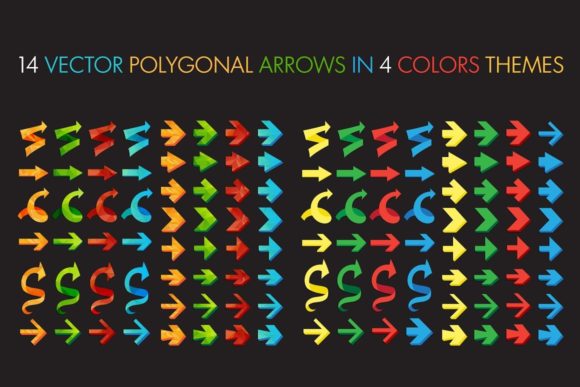
Polygonal Arrows Set: A Versatile Tool for Designers and Creators
Designing effective visual elements is essential in today's digital landscape, whether you're creating infographics, web interfaces, or presentation materials. One such tool that has gained popularity among designers is the Polygonal Arrows Set. This collection of 14 vector-based arrows offers a stylish and modern approach to directional indicators, making it a valuable resource for anyone looking to enhance their visual communication.
What is the Polygonal Arrows Set?
The Polygonal Arrows Set consists of 14 unique polygonal arrows designed in four distinct color themes. These arrows are crafted with simplicity and strength in mind, allowing them to be used effectively across various design contexts. The set includes one EPS file, one AI file, and one JPG preview file, providing flexibility in how they can be utilized and edited.
Designed for use in Adobe Illustrator 10 or above, the Polygonal Arrows Set is accessible to both beginners and experienced designers. Its clean lines and geometric shapes make it an excellent choice for those who appreciate minimalism in their designs.
Features and Characteristics
The Polygonal Arrows Set stands out due to its versatility and adaptability. Here are some key features:
- Simple and Stylish Design: Each arrow is created with a focus on simplicity, ensuring that they do not overpower the content they accompany.
- Multiple Color Themes: With four different color themes available, designers have the freedom to choose the best fit for their project's aesthetic.
- Vector Format: The availability of EPS and AI files means that the arrows can be scaled without losing quality, making them ideal for print and digital media alike.
- Wide Range of Applications: From web design to infographics, these arrows can be used in various contexts, enhancing the visual appeal of any project.
One of the most notable characteristics of the Polygonal Arrows Set is its ability to convey direction and movement clearly. Whether indicating the next step in a process or showing a return to a previous action, these arrows serve as effective visual cues.
Where Can You Use the Polygonal Arrows Set?
The applications of the Polygonal Arrows Set are diverse, catering to a wide range of industries and purposes. Some common uses include:
- Web Design: Incorporating these arrows into website navigation can improve user experience by guiding visitors through the site more intuitively.
- Infographics: In data visualization projects, the arrows can help illustrate processes, timelines, or sequences effectively.
- Presentations: When creating slides for business presentations, these arrows can be used to highlight key points or transitions between topics.
- Print Materials: Brochures, flyers, and posters can benefit from the inclusion of these arrows to direct attention and emphasize important information.
Additionally, the Polygonal Arrows Set can be utilized in decorative design elements, adding a touch of style to otherwise plain backgrounds or layouts. Their low-poly style makes them particularly suitable for modern, tech-savvy designs.
Who Benefits from Using the Polygonal Arrows Set?
The Polygonal Arrows Set is beneficial for a variety of individuals and organizations. Here are some groups that may find this set particularly useful:
- Graphic Designers: Professionals who work on a range of design projects will appreciate the versatility and quality of these arrows.
- Web Developers: Those involved in front-end development can use these arrows to enhance the visual aspects of websites and applications.
- Business Owners: Entrepreneurs looking to create marketing materials or presentations can leverage these arrows to communicate ideas more effectively.
- Students and Educators: Educational materials often require clear visual indicators, and these arrows can aid in teaching complex concepts.
By using the Polygonal Arrows Set, these individuals can elevate their projects, making them more engaging and visually appealing to their audiences.
Strengths and Considerations
While the Polygonal Arrows Set offers numerous advantages, it is also important to consider certain limitations and practical expectations when incorporating these arrows into your designs:
Strengths:
- Versatility: The arrows can be adapted to various design styles and color schemes.
- High Quality: The vector format ensures that the arrows remain crisp and clear at any size.
- Easy to Use: With the provided AI and EPS files, editing and customization are straightforward for users familiar with Adobe Illustrator.
Considerations:
- Background Mock-Ups Not Included: While the arrows themselves are high-quality, users should be aware that background mock-ups are not part of the set, requiring additional resources for complete designs.
- Limited Customization Options: Although the set includes multiple color themes, users may need to adjust colors manually if they require specific shades not included in the original set.
Understanding these strengths and considerations allows users to make informed decisions about how best to utilize the Polygonal Arrows Set in their projects.
Real-World Applications and Examples
To better understand the practicality of the Polygonal Arrows Set, let's explore some real-world scenarios where these arrows can be applied:
Example 1: Web Navigation
A website redesign project requires intuitive navigation. By incorporating the Polygonal Arrows Set into the menu system, users can easily follow the flow of the site, improving overall usability and engagement.
Example 2: Infographic Creation
When designing an infographic about a company's workflow, the arrows can be used to show the progression of tasks, helping viewers understand the sequence of operations more clearly.
Example 3: Presentation Slides
In a business presentation, the arrows can guide the audience through the slides, emphasizing key points and transitions between topics effectively.
These examples demonstrate how the Polygonal Arrows Set can be integrated into various design contexts to enhance clarity and visual appeal.
Evaluating Suitability for Different Needs
Before deciding to use the Polygonal Arrows Set, it is essential to evaluate whether it meets your specific design needs. Consider the following factors:
- Project Requirements: Determine if the arrows align with the overall theme and purpose of your project.
- Technical Proficiency: Assess your familiarity with Adobe Illustrator and vector editing to ensure you can make the necessary adjustments.
- Design Style: Evaluate whether the minimalist, polygonal style of the arrows complements your existing design elements.
By carefully considering these aspects, you can determine if the Polygonal Arrows Set is the right choice for your design needs.
In conclusion, the Polygonal Arrows Set offers a valuable resource for designers and creators looking to enhance their visual communication. With its simple yet stylish design, versatility, and high-quality vector format, it is a worthwhile addition to any designer's toolkit. Whether you're working on web projects, infographics, or presentations, these arrows can help convey direction and movement effectively, making your designs more engaging and informative for your audience.